Pages

Showing posts with label Basics of Operating Systems. Show all posts

Thursday, August 30, 2012

Control Panel

The Control Panel is a part of the Microsoft Windows graphical user interface which allows users to view and manipulate basic system settings and controls via applets, such as adding hardware, adding and removing software, controlling user accounts, and changing accessibility options. Additional applets can be provided by third party software.

The Control Panel has been an inherent part of the Microsoft Windows operating system since its first release (Windows 1.0), with many of the current applets being added in later versions. Beginning with Windows 95, the Control Panel is implemented as a special folder, i.e. the folder does not physically exist, but only contains shortcuts to various applets such as Add or Remove Programs and Internet Options. Physically, these applets are stored as .cpl files. For example, the Add or Remove Programs applet is stored under the name appwiz.cpl in the SYSTEM32 folder.

In recent versions of Windows, the Control Panel has two views, Classic View and Category View, and it is possible to switch between these through an option that appears on either the left side or top of the window.

Many of the individual Control Panel applets can be accessed in other ways. For instance, Display Properties can be accessed by right-clicking on an empty area of the desktop and choosing Properties.

The classic view consists of shortcuts to the various control panel applets, usually without any description (other than the name). The categories are seen if the user use "Details" view.

The category view consists of categories, which when clicked on display the control panel applets related to the category. In Windows Vista, the category used applets below the name of the category.

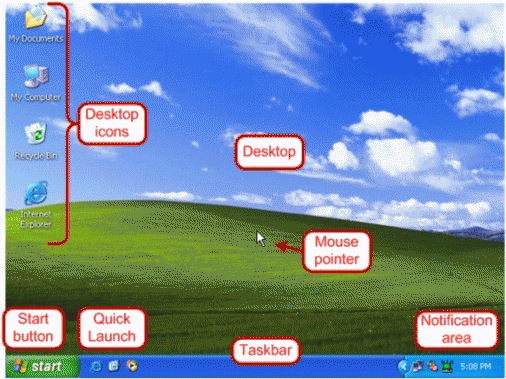
Desktop

1) Using an office metaphor, a desktop is a computer display area that represents the kinds of objects one might find on a real desktop: documents, phone book, telephone, reference sources, writing (and possibly drawing) tools, project folders. A desktop can be contained in a window that is part of the total display area or can be "full-screen" (the total display area). Conceivably, you can have multiple desktops (for different projects or work environments you may have) and switch among them.


In its Windows product, Microsoft provides what they call an Active Desktop. It includes representations of and access to desktop objects and also dynamic Web content as well, including integrated links to Websites and information areas that are generated as the result of sites pushing requested information updates to the user.

2) Desktop is also an abbreviated form of desktop computer, a personal computer that fits on top of a desk.

MS Windows – Introduction

Windows is the operating system sold by the Seattle-based company Microsoft. Microsoft, originally christened "Traf-O-Data" in 1972, was renamed "Micro-soft" in November 1975, then "Microsoft" on November 26, 1976.

Microsoft entered the marketplace in August 1981 by releasing version 1.0 of the operating system Microsoft DOS (MS-DOS), a 16-bit command-line operating system

The first version of Microsoft Windows (Microsoft Windows 1.0) came out in November 1985. It had a graphical user interface, inspired by the user interface of the Apple computers of the time. Windows 1.0 was not successful with the public, and Microsoft Windows 2.0, launched December 9, 1987, did not do much better.

It was on May 22, 1990 that Microsoft Windows became a success, with Windows 3.0, then Windows 3.1 in 1992, and finally Microsoft Windows for Work groups, later renamed Windows 3.11, which included network capabilities. Windows 3.1 cannot be considered an entirely separate operating system because it was only a graphical user interface running on top of MS-DOS.

On August 24, 1995, Microsoft launched the operating system Microsoft Windows 95. Windows 95 signified Microsoft's willingness to transfer some of MS-DOS's capabilities into Windows, but this new version was based more heavily on 16-bit DOS and retained the limitations of the FAT16 file system, so that it was not possible to use long file names.

After minor revisions of Microsoft Windows 95, named Windows 95A OSR1, Windows 95B OSR2, Windows 95B OSR2.1 and Windows 95C OSR2.5, Microsoft released the next version of Windows on June 25, 1998: Windows 98. Windows 98 natively supported features other than those of MS-DOS but was still based upon it. What's more, Windows 98 suffered from poor memory handling when multiple applications were running, which could cause system malfunctions. A second edition of Windows 98 came out on February 17, 2000; it was named Windows 98 SE (for "Second Edition").

On September 14, 2000, Microsoft released Windows Me (for Millennium Edition), also called Windows Millennium. Windows Millennium was based largely on Windows 98 (and therefore on MS-DOS), but added additional multimedia and software capabilities. Furthermore, Windows Millennium included a system-restore mechanism for returning to a previous state in the event of a crash.

Concurrent with these releases, Microsoft had been selling (since 1992) an entirely 32-bit operating system (which therefore was not based on MS-DOS) for professional use, at a time when business primarily used mainframes. It was Windows NT (for Windows "New Technology"). Windows NT was not a new version of Windows 95 or an improvement on it, but an entirely different operating system

On May 24, 1993, the first version of Windows NT was released. It was called Windows NT 3.1, and was followed by Windows NT 3.5 in September 1994 and Windows 3.51 in June 1995. With Windows NT 4.0, launched for sale on August 24, 1996, Windows NT finally became a true success.

In July 1998, Microsoft released Windows NT 4.0 TSE (Terminal Server Emulation), the first Windows system that allowed terminals to be plugged into a server, i.e. use thin clients to open a session on the server.

On February 17, 2000, the next version of NT 4.0 was renamed Windows 2000 (instead of Windows NT 5.0) in order to highlight the unification of "NT" with the "Windows 9x" systems. Windows 2000 is an entirely 32-bit system with characteristics of Windows NT, as well as an improved task manager and full compatibility with USB and FireWire peripherals.

Then, on October 25, 2001, Windows XP arrived on the scene. This was a merger of the preceding operating systems.

Finally, on April 24, 2003, a server operating system was released by Microsoft: Windows Server 2003.

Features of MS Windows
Microsoft Windows is an operating system created by Microsoft for PC computers. An operating system is the software utilized to run and manage programs and functions on the computer. Windows updates and adds to its features with each release, however some of the features it is known for are Windows Live, Windows Search, Windows Updates and Windows Taskbar.

Windows Live
Windows Live is a group of tools and software for use with Windows. All Windows users can have access to Windows Live by creating a free account. Windows Live includes a chat client, networking tools, a movie maker and photo gallery, and email and Internet functions. A user can choose to download and use all of these programs, or only download a selection of them depending on needs.

Windows Search
Because of the nature of computers, it can sometimes be difficult to locate a particular file. Windows Search is a search function included with Windows that allows the user to search their entire computer. Windows Search is located in the start menu. Users can search for files by name, date and file. The search function also allows the user to search for text within a file in case you cannot remember the document name.

Windows Updates
Windows includes an automatic update feature with the intended purpose of keeping ts operating system safe and up-to-date. Security updates are installed with this feature to help protect against new risks as well as to apply any software updates and bug fixes. Users can set this feature to check for new updates and install them automatically or turn off the automatic update feature and check for updates on their own. Windows recommends automatic checking for updates for the maximum security.

Windows Taskbar
The taskbar in Windows is located at the bottom of the screen by default, but can be moved to the top or sides of the screen if the user chooses. The taskbar is the main navigation tool for Windows. It includes the Start Menu, which allows users to access programs and features. It also includes a clock, calendar, and program icons for things such as commonly used programs and updates. The taskbar and the items displayed in it are customizable.

Introduction and Features of Operating Systems

An operating system (OS) is a collection of software that manages computer hardware resources and provides common services for computer programs. The operating system is a vital component of the system software in a computer system. Application programs require an operating system to function.

Time-sharing operating systems schedule tasks for efficient use of the system and may also include accounting for cost allocation of processor time, mass storage, printing, and other resources.

For hardware functions such as input and output and memory allocation, the operating system acts as an intermediary between programs and the computer hardware, although the application code is usually executed directly by the hardware and will frequently make a system call to an OS function or be interrupted by it. Operating systems can be found on almost any device that contains a computer—from cellular phones and video game consoles to supercomputers and web servers.

Examples of popular modern operating systems include Android, BSD, iOS, Linux, Mac OS X, Microsoft Windows, Windows Phone, and IBM z/OS. All these, except Windows and z/OS, share roots in UNIX.


Features of Operating Systems
The features of the operating systems are totally dependent on the type of software. Every operating system differs from each other in some features while there are some features which are common in all operating systems.

Some of the features of operating systems are detailed here.

  • Software and hardware management
The operating system is the bridge between computer hardware and software and makes the communication between them possible. Also communication between different software in the computer is also taken care by operating system.

  • Constant API
Application Program Interface (API) is a software that allows different applications that run on a computer to work on other computers also. But they should have same operating system. So it is very vital to have consistent API in the operating system.

  • Execution of programs
Programs running in the computer are completely dependent on the operating system. But program execution is a tough process. The multitasking and multithreading features of the operating system are dependent upon the type of program execution feature of O.S.

  • Interruptions
Interruption may happen at any time while using the computers. So the operating system should allow and handle many numbers of interrupts. Whenever an interruption occurs, the operating system should respond to it by saving and stopping the current execution and work on the new execution. This is the most hard-hitting process for the operating system.

  • Managing memory
The operating system provides the memory for the programs that are executed at any moment. So the operating system should have good memory allocation facility to execute the programs smoothly. The prioritization and allocation of memory to the applications running should be taken care by the operating systems.

  • Networking
Today computers are nothing without internet connection or some network connection. This is the age of networking. So if computers are connected to a network, the there should be definitely communication between one computer and another. So the operating system is what makes it possible for one computer to communicate with other computers.

  • Security
Security is the important feature that should be looked for in an operating system. An operating system in the computer takes care of all security issues of computer and data in it. Log in passwords, firewall settings, and every such aspect related to security depends on the ability of the operating system. Some of the computers in network may involve in file sharing, and other data sharing. So it is important in such cases to have powerful secured operating systems.